Find fuel before your next jump
Look for locations explicitly marked for trade rather than assuming every starbase sells fuel. Update 95 reduced the reputation impact of running empty; it did not promise unlimited fuel.
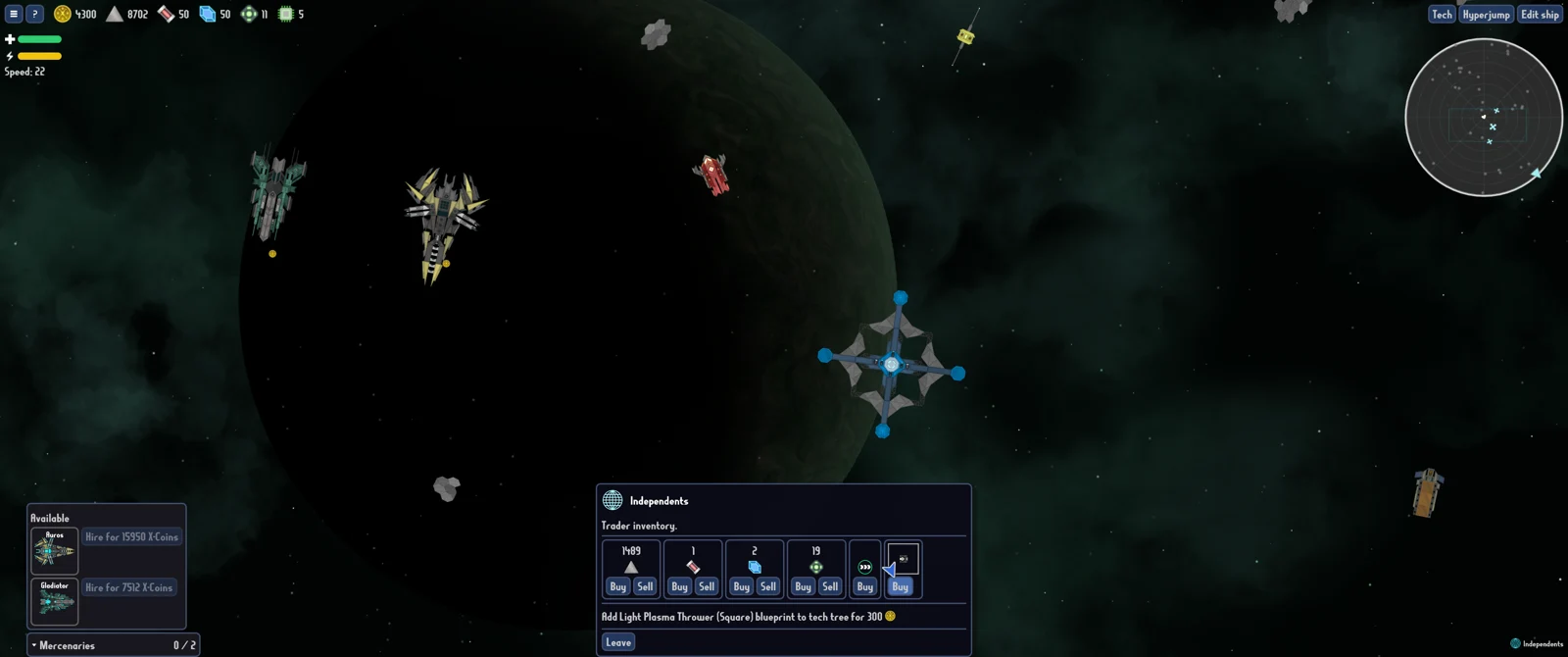
Check the map for a location explicitly marked for trade before treating a starbase as a fuel stop. In the September fuel discussion, players repeatedly distinguish trading locations from ordinary faction bases. That is the practical first check when you approach a station and no trading dialog appears.
Update 95 reduced the reputation impact of running out of fuel in a faction's territory and fixed an out-of-fuel encounter returning to the wrong encounter. It did not announce unlimited fuel, guaranteed fuel asteroids, or a fixed amount supplied by every faction. A route still needs a plan for supplies.
Separate traders from starbases
The player who opened the discussion had already tried traders, asteroids and combat, but found supply inconsistent. Replies emphasized that a base's appearance or description does not necessarily make it a trader. They recommended looking for trade labels on the hyperjump map.
Use that distinction before diagnosing a broken dialog. If the location is a faction starbase and is not marked for trade, the absence of a shop is not by itself evidence that fuel trading is malfunctioning. If it is a trading location, approach it and inspect the actual offer rather than assuming the screenshot's stock is what your run will have.
Players recommend checking the location's trade designation. Read the location name and label carefully when map symbols look similar, so you can distinguish a trade stop from a faction base.
Make a supply check before committing to a route
Before another stretch of exploration, check the fuel you currently have and the trading locations you can identify. If you can reach a trader, inspect the fuel offer while you are there rather than assuming there will be a convenient one later. Players report that buying fuel becomes easier as they gain more coins, but that is a progression observation rather than a universal price or route.
Keep your decision tied to the current map and inventory. A long detour to an uncertain supplier can be worse than a shorter route with a known trade stop. The 1.0 notes say previously visited areas can be revisited quickly and cheaply, so review those areas when planning your next move.
If a trader offers both fuel and another attractive purchase, solve the immediate route problem first. A new blueprint or mercenary is not useful if the next objective is unreachable. This is a supply-priority recommendation, not a claim that the game enforces a particular purchase order.
What about asteroids and combat drops?
The discussion includes reports of fuel from asteroids and defeated ships, but it does not establish a dependable asteroid spawn rate or a guaranteed fuel drop for each kill. The original player's estimate of how rarely fuel asteroids appeared is their experience, not a measured drop table. Do not build a route that depends on that estimate being universal.
The official 1.0 notes say resource-rich asteroids are marked on the minimap. That can help you inspect resource opportunities when present, but “resource-rich” is broader than “guaranteed fuel.” Check what you actually find rather than treating every marked asteroid as a complete refill.
Some players suggest fighting more ships for supplies. Others warn about damaging useful faction relationships. Keep your current mission's enemies and your longer-term faction relationships in mind before attacking a neutral ship for resources.
Running empty after Update 95
The patch contains two important changes to distinguish:
| Change | What it means for your decision |
|---|---|
| Lower reputation impact when out of fuel in faction territory | Older reports of a particular reputation penalty may no longer describe the current version. |
| Fixed the out-of-fuel encounter returning to the wrong encounter | An older report of ending up in the wrong encounter may refer to a fixed bug. |
| No guaranteed refill quantity stated | Read your actual encounter result; do not expect a fixed number from every rescue. |
| No fuel economy overhaul described | Continue planning stops rather than assuming the update removed shortages. |
If you do run empty, read the encounter the game presents and follow its available choices. Players discuss distress assistance and differing amounts, but their reports are not consistent enough to promise a universal rescue payout. The developer confirmed the reputation adjustment; the patch does not give a replacement penalty number.
Diagnose the actual failure
If no trading dialog opens, first check whether the location is designated for trade. If it is, record the location, faction relationship, game version and what you did on arrival. If an out-of-fuel sequence returns you to an unexpected encounter, confirm Update 95 is installed and describe both the starting and returned encounters when reporting it.
Avoid using an old reputation figure as proof that the current patch is broken. Compare the visible result in your run with the current announcement, and include the version in any report. If controls are preventing you from reaching the trader, solve that separately with the Steam Deck controls guide.
For a ship redesign, see Respecialize and technology planning. For the extra decisions that come with a carrier, see hangars and custom drones.
Further reading
- Fuel supply discussion — player observations about trade stops, drops and shortages; developer reply about reputation.
- Update 95 — the current reputation and encounter fixes.
- Official game updates — 1.0 backtracking and minimap changes.
- All guides.